
Computer maintenance tips, information, and technology news
Year: <span>2012</span>

Year: 2012

Firefox Add-ons

As many of you already know, my browser of preference is Mozilla Firefox. Although Internet Explorer 9 has come a long way and is a fantastic browser, the customization available to Firefox through it’s thousands of Add-ons always has me returning to it as my primary browser.

What do Add-ons do?

They add additional features to your browser and allow you to customize your browsing experience.

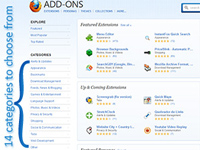
Firefox has plenty of add-ons, grouped into 14 Categories, available at the Mozilla Add-ons website.
Firefox 10

Mozilla has just released Firefox 10. If you’re using an older version, now is the perfect time to upgrade. Firefox 10 is much faster than it’s predecessors, more secure, uses less memory and is more stable as well.

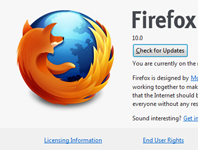
To upgrade just go to Help, About Firefox and click the Check for Update button. Firefox will download the update and you will be prompted to install the latest version.

If you don’t currently use Firefox and want to see what all the fanfare is about, you can read more (and download it) at the Mozilla Firefox website.

MSE: Great Free Antivirus Protection

Once upon a time, if you wanted to keep your PC safe online, you needed to have an updated version of a favorite paid Antivirus program. Freeware Antivirus programs were not recommended because their detection and removal rates were subpar. Lucky for us consumers, today that is no longer the case.

Free Antivirus programs no longer offer mediocre protection. Detection rates and cleanup routines have improved considerably. Many free Antivirus programs rank as well as Top-notch paid programs. In today’s economy where every penny saved counts, there are quite a few excellent freeware Antivirus solutions to choose from.